






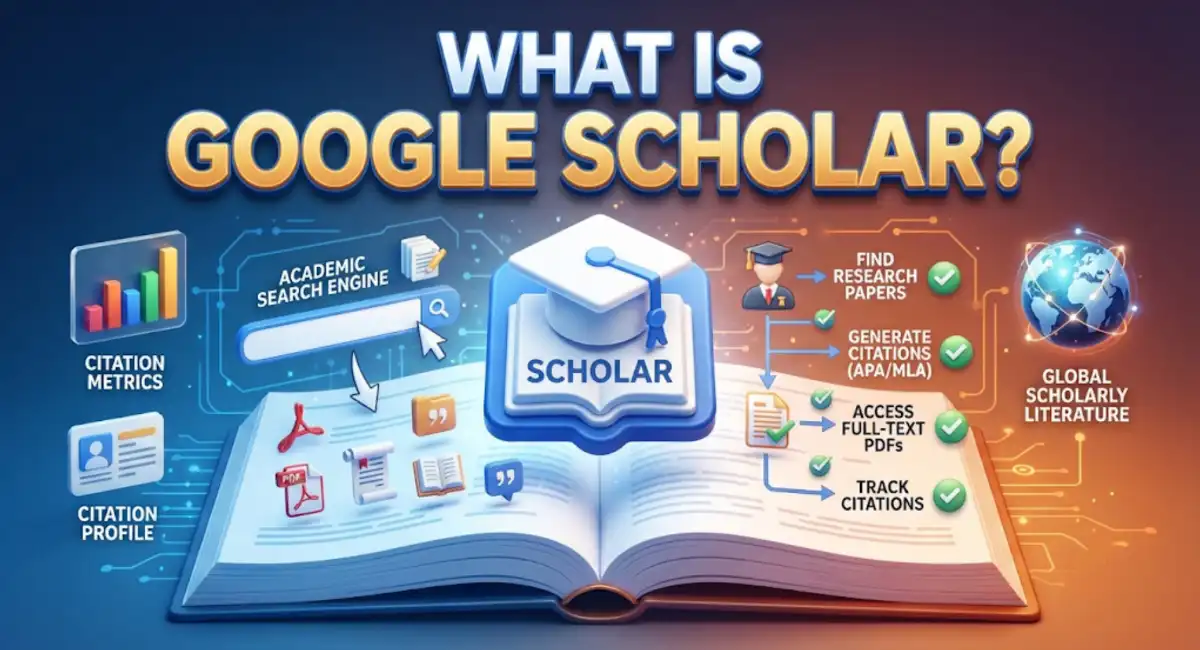
Google Scholar is a free academic search engine built by Google that indexes scholarly literature across disciplines and formats. Rather than pulling general web pages, blogs, or commercial listings, it searches peer-reviewed journals, university repositories, theses, dissertations, books, conference papers, preprints, and legal opinions.
Whether you are a university student writing a term paper, a researcher conducting a literature review, or an author tracking how often your work is cited, Google Scholar puts verified academic sources in one familiar, easy-to-use search bar.
Why Use Google Scholar?
Standard web searches return millions of results mixed with marketing pages, opinions, and unverified summaries. Google Scholar filters out that noise and focuses exclusively on credible scholarly sources:
- Completely free access: Searching and viewing abstracts, citation data, and millions of open-access PDFs costs nothing.
- Broad academic coverage: It indexes material from major academic publishers, professional societies, university archives, and preprint servers—including conference papers and repositories that standard search engines rarely surface cleanly.
- Citation and impact tracking: Every search result shows how many times an article has been cited, helping you identify foundational papers and follow how a research topic evolved over time.
- Fast source verification: Instead of guessing whether a web article is credible, you immediately see the authors, publication venue, year, and institution behind each paper.
Google Scholar vs. Standard Google Search
Although Google Scholar shares Google’s clean, fast search interface, it is built specifically for academic workflows:
| Feature | Google Scholar | Standard Google Search |
|---|---|---|
| Primary Content Indexed | Peer-reviewed articles, theses, books, preprints, court cases | All public web pages, news, blogs, videos, commercial sites |
| Built-In Citations | One-click formatting in APA, MLA, Chicago, Harvard, and Vancouver | None |
| Reference Manager Export | Direct export to BibTeX, EndNote, RefMan, and RefWorks | None |
| Citation Count & Related Articles | Shows “Cited by” counts and “Related articles” links per paper | None |
| Library Integration | Links directly to institutional library subscriptions for full-text PDFs | Standard public web links only |
Read More Also – Why People and Businesses Use Virtual Private Networks
How to Search and View Items in Google Scholar
Searching on Google Scholar works much like regular Google, but ranking is heavily influenced by full-text relevance, publication venue, author, and citation count.
- Open Google Scholar: Go to
scholar.google.comin your browser (or launch Google Scholar through your university library’s portal if you want institutional full-text links enabled automatically). - Enter your topic or keywords: Type your research topic, paper title, or author name into the main search bar and press Enter.
- Filter results using the left sidebar: Narrow your results by custom publication year ranges (such as Since 2022 or Since 2025), sort by relevance or date, and choose whether to include patents and citations.
- Explore “Cited by” and “Related articles”: Click Cited by [number] beneath any result to see newer studies that referenced that paper, or click Related articles to find closely aligned research.
How to Find Full-Text PDFs in Search Results
While Google Scholar indexes millions of papers, some articles sit behind publisher paywalls. You can locate readable full-text copies in a few quick steps:
- Run your search: Enter the paper title, citation details, or topic keywords into the search bar.
- Check the right-hand margin: Look to the right of each search result for a direct
[PDF]or[HTML]link—these point to free, openly hosted versions on university repositories or preprint archives. - Use university library links: If you connect your college or university library under Settings > Library links, an institutional access link (such as Full Text @ Your University) will appear beside eligible papers.
- Click “All versions”: If the primary link asks for payment, click All [X] versions under the snippet—an author’s accepted manuscript or open-access repository copy is often listed there for free.
- Check with your library desk: If a required paper still lacks an open link, your university library service desk can typically retrieve it through interlibrary loan.
How to Use Google Scholar as a Student
For students preparing assignments, literature reviews, or theses, combining a few search habits makes research faster and far more organized:
- Put exact phrases in quotation marks: Searching
"climate change adaptation"forces Google Scholar to match that exact phrase rather than scattering the individual words across unrelated sections. - Filter by publication year: In fast-moving fields like computer science, medicine, or digital marketing, use the left sidebar to restrict results to the last 3–5 years so your references stay current.
- Search by author or title prefix: Use operators like
author:"last name"orintitle:"keyword"to pinpoint specific researchers or papers focused directly on your topic. - Generate instant citations: Click the quotation mark icon (
") below any result to copy formatted citations in APA, MLA, Chicago, Harvard, or Vancouver, or download.bib/.risfiles for Zotero, Mendeley, or EndNote. - Save and organize with “My library”: Click the star icon (
☆) under any useful paper to save it to My library, then apply custom labels (such as Chapter 1, Methodology, or To Read) to keep sources grouped by assignment.
What Are Google Scholar Citations?
Google Scholar Citations is a free author profile service that lets researchers, professors, and published students showcase their publications and monitor academic impact in real time. With a public Scholar profile, authors can:
- Maintain a verified list of their published papers, conference proceedings, and books.
- Track who is citing their work and receive email alerts when new citations appear.
- View visual bar graphs showing citation growth year by year.
- Monitor key bibliometric indicators automatically:
- Total citations: How many times your publications have been cited overall.
- h-index: The largest number h such that h of your publications have each been cited at least h times.
- i10-index: The number of publications you have written that have received at least 10 citations.
How to Set Up a Google Scholar Citation Profile
- Sign in to Google Scholar: Open
scholar.google.comand log in with your Google account. - Open “My profile”: Click My profile in the top-left corner of the page.
- Enter your details: Fill in your full name as it appears on publications, your university or organization affiliation, research interests, and your institutional email address (required if you want your profile eligible to appear in public search results).
- Select your publications: Google Scholar will suggest groups of articles matching your name—select the ones you authored and click Next.
- Choose update preferences: Decide whether you want Google Scholar to add newly discovered publications to your profile automatically or send you an email for manual review before adding them.
Read More Also – Understanding Prime Numbers and Edge Cases
Practical Tips to Improve Your Google Scholar Searches
- Case sensitivity doesn’t matter: Searching
Machine Learningandmachine learningreturns the exact same results. - Use Boolean operators in uppercase: Combine terms using
AND,OR, and-(minus) to narrow or broaden results—for example:"renewable energy" AND solar -wind. - Start with review articles: Adding
"literature review"or"systematic review"to your topic query helps you find comprehensive overview papers that summarize major findings and cite dozens of key studies you can explore next. - Set up email alerts: Click Create alert at the bottom of the left sidebar on any search results page to receive automatic email notifications whenever new papers matching your keywords are published.
Read More Also – How Many Keys Are on a Computer Keyboard? Complete Key Breakdown Guide